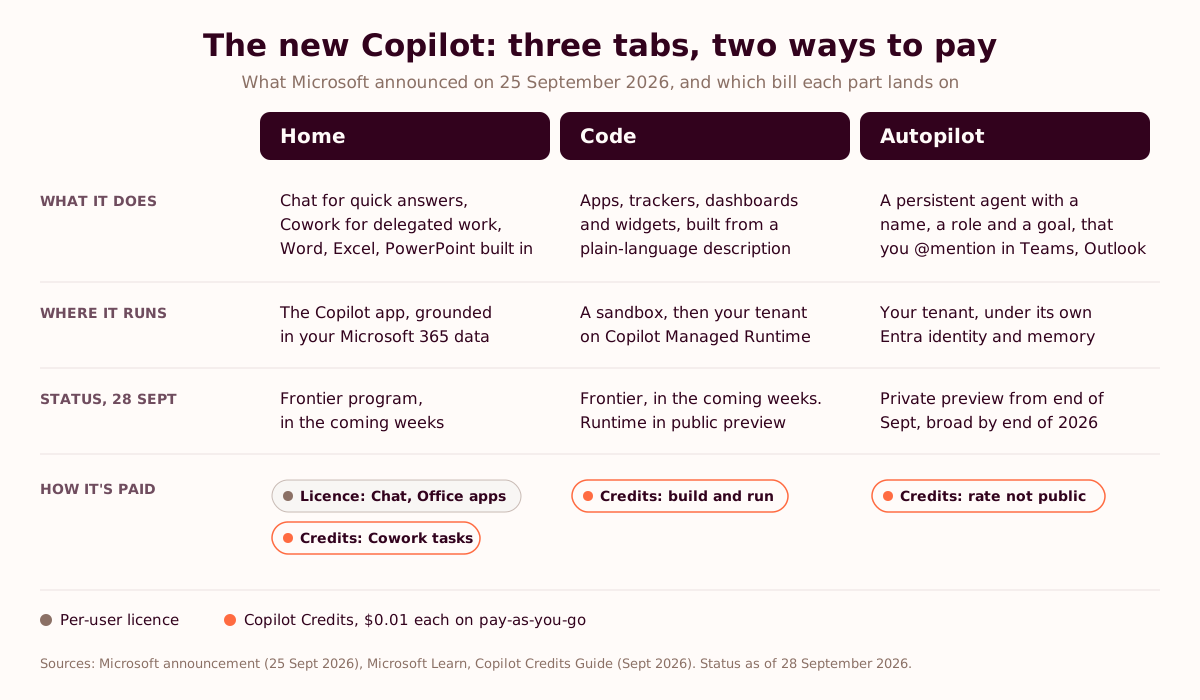
The new Microsoft Copilot is the rebuilt Copilot app Microsoft announced on 25 September 2026. It has three tabs. Home puts Chat and Cowork in one place, with full versions of Word, Excel and PowerPoint inside the app. Code builds apps, dashboards and trackers from a description. Autopilot is a persistent agent with its own identity, memory and workspace. Everyday use stays on the per-user licence, while Cowork, Code and Autopilot are paid for in Copilot Credits, at $0.01 each on pay-as-you-go. Home and Code reach Microsoft's Frontier program first. Autopilot's private preview expands at the end of September.
A new Copilot app, and the same usage report
You bought the licences. The usage report shows a handful of people who live in Copilot and a long tail who tried it in the first week and drifted back to the old way. Somebody on the board has started asking what the renewal buys.
On 25 September, Microsoft answered with a new app. It has three tabs, the Office apps built in, and a second bill for anything an agent does on its own.
Microsoft named the new agent Autopilot. Eight days earlier, on the Official Microsoft Blog, the company's Chief Strategy and Transformation Officer had written that "a tool licensed to over 200,000 people does not change how the work gets done." The tool was Copilot. (We went through that post in what Microsoft learned from 200,000 employees.)
The new app is a real step forward, and we'll show where. Somebody still has to decide which piece of work changes, and how anyone will know it did. The meter puts a price on not knowing.
What is the new Microsoft Copilot app?
The new Copilot is one app for three kinds of work: asking and drafting (Home), building small tools (Code) and handing ongoing responsibilities to an agent (Autopilot). Microsoft announced it on the Official Microsoft Blog on 25 September 2026, and Satya Nadella pitched it as a "new OS for work that spans every model, every form factor, and every task."
The rollout is smaller than the pitch. Most of it is preview, and it arrives one tab at a time.
| Tab | What it does | Status on 28 September 2026 | How it's paid for |
|---|---|---|---|
| Home | Chat for quick questions and drafts, Cowork for delegated multi-step work, and full Word, Excel and PowerPoint inside the app | Rolling out to the Frontier program "in the coming weeks" | Chat and the Office apps: per-user licence. Cowork tasks: Copilot Credits |
| Code | Builds apps, trackers, dashboards and desktop widgets from a plain-language description, on the technology behind GitHub Copilot | Frontier, "in the coming weeks". Apps can run in your tenant on Copilot Managed Runtime, in public preview | Copilot Credits, to build and to run |
| Autopilot | A persistent agent with a name, a role and a goal. It watches channels, follows up on threads, runs recurring work and picks projects back up days later | Private preview expands at the end of September, with broad availability planned by the end of 2026 | Copilot Credits |
Home: Chat, Cowork and the Office apps in one window
Home is the new landing tab. Chat and Cowork sit side by side, and Microsoft draws the line between them clearly. Chat handles quick questions, lookups and drafts, one turn at a time. Cowork takes work you hand off:
"You define the task and it runs end-to-end to return a completed result: an RFP response, a launch kit, a customer briefing, a financial close package or any other complex work worth iterating on."
Microsoft, launch announcement, 25 September 2026
For most teams the bigger change is Office in Copilot. Full versions of Word, Excel and PowerPoint now open inside the Copilot app, and Microsoft was keen to say "this is not just some simplified viewer." In the launch demo, a product manager had Copilot pull data into an Excel workbook, accept tracked changes in a Word document and turn both into a PowerPoint deck, without leaving the app. If you've watched a colleague download a Copilot draft, reopen it in Word, fix the formatting and upload it again, you know which step that removes.
Microsoft says it wants Copilot to route the work itself, so you describe the outcome and Copilot decides whether it's a job for Chat, Cowork or Code (Computerworld). Today you still pick the tab. Cowork itself isn't new, and our Copilot Cowork guide covers the first release. Since 16 June 2026, every Cowork task has drawn Copilot Credits.
Code: apps for the jobs too small for IT
Code turns a description into working software. Ask for a tracker, a dashboard over live data, a desktop widget or a small internal app, and Copilot picks an approach and builds it in a sandbox, using the same underlying technology as GitHub Copilot. It's aimed at the jobs that sit between a formal IT project and a Power Automate flow, which in most companies means the bottom of the IT backlog.
Where the app runs is the part IT will care about. Apps built in Code, Cowork or Copilot Studio can be hosted on Copilot Managed Runtime, which Microsoft opened in public preview the same day. They run inside your Microsoft 365 tenant, sign people in with Microsoft Entra, follow tenant policies and appear on a new Apps page in the Microsoft 365 admin center, where admins can review usage and switch apps on or off (Microsoft Learn).
Jacob Andreou, the executive vice president who runs Copilot, told VentureBeat that hosting and sharing an application "literally becomes as simple as saving and sharing a Word document." Anyone who has inherited a finance team's macro-filled spreadsheet will read that sentence twice. Our guide to vibe coding and agentic workflows covers the point where a business-built tool becomes dangerous.
Autopilot: Scout, moved into your tenant
Autopilot is the agent Microsoft introduced on 2 June 2026 as Scout, a desktop app for Windows and Mac (our Scout guide explains that version). Less than four months later it has a new name and lives in the cloud. Microsoft calls it "a persistent, proactive and personal agent that keeps working even when you're not."
You give it a name, a role and a goal. From there it watches channels, follows up on threads, runs recurring work and picks a project back up days later, without waiting for a prompt. It lives in your tenant with "its own identity, memory, computer and workspace", and you @mention it in Teams or Outlook like a colleague.
The move off the laptop is deliberate. Andreou told GeekWire that "sending your most sensitive files down to a local machine into a VM was a complete nonstarter", which GeekWire read as a swipe at Anthropic's Claude Cowork. For your security team, it means the agent's work stays inside the tenant, under an Entra identity with scoped credentials, limits on where it can send things, optional human sign-off and Purview policies.
Two caveats. Microsoft says Autopilot's admin controls for permissions, audit and memory will come later, with broad availability planned by the end of the year. And the Scout desktop app goes into maintenance mode, with "no additional capabilities added" (Empowering.Cloud). If you piloted Scout, that pilot stops getting new features.
What are the pros of the new Copilot?
Five things, in the order we think they matter to a company that already pays for Copilot.
- The work stays in one window. Chat, Cowork and the Office apps share a screen, so a draft no longer travels through a downloads folder and a second app before anyone can use it.
- Business users can build small tools that IT can see. Apps from Code run on Managed Runtime inside the tenant, with Entra sign-in and an inventory in the admin center. The finance analyst's tracker stops living on one laptop.
- The agent has an identity, so its actions have an owner. Autopilot works under its own Entra identity with audit and Purview behind it. You can see what it did, limit where it sends things and switch it off.
- Model choice sits with the admin. Anthropic's Claude Fable 5.1 and OpenAI's GPT-6 Astra arrived in Cowork and Copilot Studio in September, and admins can limit which model families each group uses (Empowering.Cloud). When the next model ships, switching is a setting. (Our guides to Claude Fable and GPT-6 Astra at work cover what each is good at.)
- Every agent task has a price. Users can type /cost in Cowork to see what a task used, and admins get a Cost Management dashboard. For the first time, a Copilot task has a number you can hold up against the hour it replaced.
Most buyers will file the fifth under cons. We don't.
What are the cons of the new Copilot?
The downsides are mostly about timing and money.
- Two bills replace one. The seat price is fixed and the credit bill moves with use. Finance signed off a flat number and now gets a variable one, which needs an owner and a monthly review.
- Almost everything is preview, behind an entry fee. Home and Code start in Frontier, Autopilot is in private preview and Managed Runtime is in public preview. Frontier needs a paid Copilot licence, modern billing and an admin opt-in, and Microsoft's own documentation says Frontier features "are preview and subject to change" (Microsoft Learn). Copilot Chat users don't see any of it.
- Another rename to explain. Scout became Autopilot less than four months after launch. Your champions redo their material, and any internal guide that mentions Scout needs rewriting. It's the same churn we described in AI model fatigue, applied to product names.
- The value follows your data. Copilot grounds its work in what lives in Microsoft 365, plus Dynamics 365, Power Platform and Fabric data through Work IQ and Fabric IQ. If your pipeline sits in Salesforce and your documents in Google Drive, Copilot only sees them through connectors someone has to set up and look after.
The entry fee matters more than it sounds. Microsoft reported more than 30 million paid Microsoft 365 Copilot seats in July 2026 (Microsoft FY26 Q4 results), against more than 450 million commercial Microsoft 365 seats in January (Office 365 for IT Pros). That's roughly one seat in fifteen, on our arithmetic across two quarters. On those numbers, most of the people who'd get the most from Code aren't licensed for Frontier yet.
What are the limits and risks of the new Copilot?
The risks sit in four places: what agents can reach, apps nobody looks after, a meter nobody watches, and the oldest one, licences that don't change the work. The UK's National Cyber Security Centre named the agent risks in its interim guidance on agentic AI in August 2026 (NCSC), and each one maps onto Autopilot.
| NCSC agent risk | Where it shows up in the new Copilot | What we'd settle before the preview |
|---|---|---|
| Broader access to external systems, data and tools | Autopilot watches channels and threads across Teams and Outlook. Code apps connect to live data | Scope the agent's identity to named channels and sites, and list the destinations it may send to |
| Goals interpreted in ways a human wouldn't expect | Autopilot takes its brief as a name, a role and a goal, in plain language | Write the goal as a job description with limits. Human sign-off on anything that leaves the company |
| Problems surfacing faster than people can review them | An agent running recurring work keeps producing output while you're away | Start with read-and-draft duties, with a named reviewer on its output |
| Actions that are harder to explain than a chat answer | An agent's choices spread across days of work and several apps | Turn on audit and name the person accountable for each agent |
The left-hand column is the NCSC's. The right-hand column is our view.
Old permissions become an agent's reading list. Copilot works with whatever the identity behind it can reach, whether that's yours in Cowork or the agent's own in Autopilot. That includes the SharePoint site someone shared with the whole company years ago. Our pieces on shadow AI and a governance framework for mid-market companies cover the clean-up.
Code apps outlive their builders. An inventory tells IT an app exists. Somebody still has to own it, review it and switch it off, and when the analyst who built the forecast tracker changes teams, that somebody is usually nobody.
Spending caps stop the work mid-month. When a spending policy reaches its limit, the people on it lose access to the agents it covers until credits reset on the first of the next month (Microsoft Learn). A team that hits its cap in the third week learns to stop using Cowork, and the habit you paid to build goes with it. We'd set caps with alerts and a review, and treat a team hitting its cap as a question about the workflow.
Each model is also a data decision. Check which terms a model runs under before you open it to a group. Consultancy 2tolead makes the same point about GPT-6 Astra in Cowork, and our zero data retention comparison sets out what each provider offers.
The fourth risk is the one Microsoft has already written up about itself. Licences for over 200,000 people didn't change how its work got done until teams started from a business outcome and redesigned the workflow. Better tabs don't change that on their own.
The book
The tool was never the problem. Nobody taught them to drive.
Microsoft now ships an agent called Autopilot, and the teams that get value from it will be the ones that redesigned the work first. Teach Them to Drive is the playbook we run with teams whose AI tools went live while the work stayed the same: why adoption stalls, how to find what's blocking it, and a 90-day plan to change one workflow and measure it. Paperback and Kindle.
Get Teach Them to Drive on Amazon →Use cases: which teams get the most from Home, Code and Autopilot?
The new structure pays off where one workflow needs all three tabs: a delegated draft, a small tool to track the work, and something to chase the loose ends. These are the six workflows we'd start with, and what we'd measure. None of them is a case study yet, since Autopilot's private preview only widens at the end of September.
| Workflow | Home (Chat, Cowork, Office) | Code | Autopilot | What to measure |
|---|---|---|---|---|
| Bid team: tender response | Cowork drafts answers from past bids and the question list, in Word, with pricing in Excel | A tracker of questions, owners and due dates | Chases section owners in the bid channel and flags new clarification questions | Hours from tender received to first full draft |
| Finance: month-end close | Cowork assembles the close package, one of Microsoft's own examples | A variance dashboard over live data | Follows up on missing accruals and approvals in Teams | Business days to close |
| Account management: quarterly business review | Cowork builds the customer briefing from mail, meetings and files, then the PowerPoint deck | An account health widget | Follows up on the actions agreed in the meeting | Prep hours per review, actions closed on time |
| Marketing: product launch | Cowork produces the launch kit: brief, deck and plan | A launch checklist shared with sales | Posts the weekly status digest from the launch channel | Days from brief to a launch-ready kit |
| PMO: steering committee pack | Chat for lookups, Cowork for the status pack | A RAID log app for the programme | Chases workstream owners for updates before the committee | Hours spent compiling status |
| HR: new joiner onboarding | Cowork drafts the onboarding pack for each role | A checklist app for hiring managers | Reminds managers about unfinished onboarding steps | Days until a new joiner's first solo deliverable |
We'd start with the bid team. Tender work repeats and the deadline is external, so a late section has a cost the whole team can see. Before anyone opens Cowork, the team agrees where past answers live and times its last few responses, start to finish. Then Cowork drafts, the tracker shows what's missing, and Autopilot does the chasing that usually lands on the bid manager.
Finance comes second, for a different reason: the close already has a number people watch. Days to close sits on the CFO's dashboard today, so if the close package gets from Cowork's draft to sign-off faster, nobody needs a survey to find out.
The HR row is the one we'd hold back. Onboarding touches personal data, and an agent reminding managers about a new joiner's paperwork needs its permissions set with care. That one waits until Autopilot's admin controls ship.
How do you implement the new Copilot?
Roll it out tab by tab, in the order the controls exist. Home and Cowork go first, on one measured workflow. Code follows once you have an app policy, and Autopilot comes last, when Microsoft publishes its admin controls. The spending policy goes in before anyone gets access.
- Check who can join. Frontier needs paid Copilot licences, modern billing and an admin opt-in by an AI Admin, Security Admin or Office Apps Admin. In the Microsoft 365 admin center, go to Copilot, then Settings, open View all, search for Frontier and select Copilot Frontier. Features can take up to three hours to appear (Microsoft Learn).
- Set the meter before the switch. Under Copilot, then Cost Management, create monthly spending policies for the organisation, a service, a group or named people, with alerts before the limit. Tell the pilot group that typing /cost in Cowork shows what a task used (Microsoft Learn).
- Clean up what an agent could read. Review SharePoint and Teams permissions for the pilot group, label the sites that need it and decide which model families the group gets.
- Pick one workflow with a number attached, and measure it before anything changes: cycle time from trigger to done, how many hands it passes through, where it waits. That baseline is what finance will ask for.
- Start in Home with one team and its manager. Put the chosen workflow through Cowork on live cases. The manager runs their own work through it first, in front of the team, and the team meets for 30 minutes a week to go through what worked and what broke.
- Open Code with an app policy. Decide who can publish to Managed Runtime, who owns each app, when it gets reviewed and when it's switched off. The Apps page in the admin center is your inventory.
- Give each Autopilot a job description before it gets an identity: its name, role and goal, the channels it watches, what it may do alone, what needs a human sign-off, who owns it and its monthly credit budget. Keep it away from sensitive channels until Microsoft ships the permission, audit and memory controls.
- Measure at 30, 60 and 90 days, against the baseline and against the credits spent. If cycle time didn't move, change the workflow before you raise the cap.
Steps 4, 5 and 8 are the method in Teach Them to Drive and the way our Copilot adoption programmes run. They don't depend on which tab ships next. If you'd rather see where your teams stand first, the AI adoption diagnosis takes eight minutes.
How much does the new Copilot cost?
The new Copilot has two prices. A per-user licence covers everyday work: $30 per user per month for Microsoft 365 Copilot and $21 for Copilot Business, on an annual commitment, at US list prices. Agent work is metered in Copilot Credits at $0.01 each on pay-as-you-go, and Cowork, Code, Autopilot and the frontier models Fable and Astra all draw on them. Moor Insights & Strategy summed it up as "a seat for everyday work, a meter for agent work."
| Plan | US list price | For | Notes |
|---|---|---|---|
| Microsoft 365 Copilot | $30 per user per month, annual commitment ($360 a year) | No seat limit | Add-on to a qualifying Microsoft 365 plan |
| Microsoft 365 Copilot Business | $21 per user per month, annual ($252 a year), or $25.20 with monthly billing | Up to 300 users | $18 per user per month until 31 December 2026 on an annual commitment, first year only |
| Copilot Credits, pay-as-you-go | $0.01 per credit, billed in arrears | Tenants with usage-based billing switched on | No commitment |
| Copilot Credits, pre-purchase plan | Paid up front for the year | Steady, predictable use | 5% off at 300,000 credits, up to 20% off at 300 million. Unused credits expire at the end of the year |
UK and EU prices differ by currency and region, so check the Microsoft Copilot pricing page for your market. The split between the two bills looks like this, based on Microsoft's September 2026 Copilot Credits Guide and FiveForward's reading of the rate card:
| Covered by the per-user licence | Paid in Copilot Credits |
|---|---|
| Copilot Chat | Cowork tasks |
| Copilot in Word, Excel, PowerPoint, Outlook and Teams | Code, to build and run apps |
| Researcher, Analyst and Facilitator | Autopilot |
| Work IQ grounding and model choice | The frontier models Fable and Astra, Copilot Studio agents and Work IQ APIs |
Credit use scales with the model, the context a task pulls in, the tools it calls and how long it runs. A scripted answer costs 1 credit and a single reasoning-model response 100, according to FiveForward. Partner estimates from Quisitive and A Guide to Cloud & AI put a light Cowork task at about 100 to 300 credits ($1 to $3) and a heavy one at 700 or more. In Microsoft's illustrative bands, as FiveForward reports them, building a medium app in Code takes about 400 to 750 credits, and running it about 300 to 500 a month. Autopilot's rate isn't public yet.
One date for anyone buying through a partner: from 2 November 2026, new Copilot Business licences bought through a Cloud Solution Provider come with usage-based billing switched on, pay-as-you-go by default and a preset monthly limit (Microsoft Partner Center). Ask your partner what that limit is.
For a 50-person team on Copilot Business where ten people use Cowork daily, a month could look like this.
| Line | Assumption | Per month |
|---|---|---|
| Copilot Business seats | 50 people at $21 ($18 on the 2026 promotion) | $1,050 ($900) |
| Cowork, light use | 10 people, one light task a working day at about 200 credits, 20 days | 40,000 credits: $400 |
| Cowork, heavy use | The same 10 people, one heavy task a working day at about 700 credits | 140,000 credits: $1,400 |
| Code | Two medium apps running, about 400 credits each | 800 credits: $8 |
| Autopilot | Rate not published yet | Unknown |
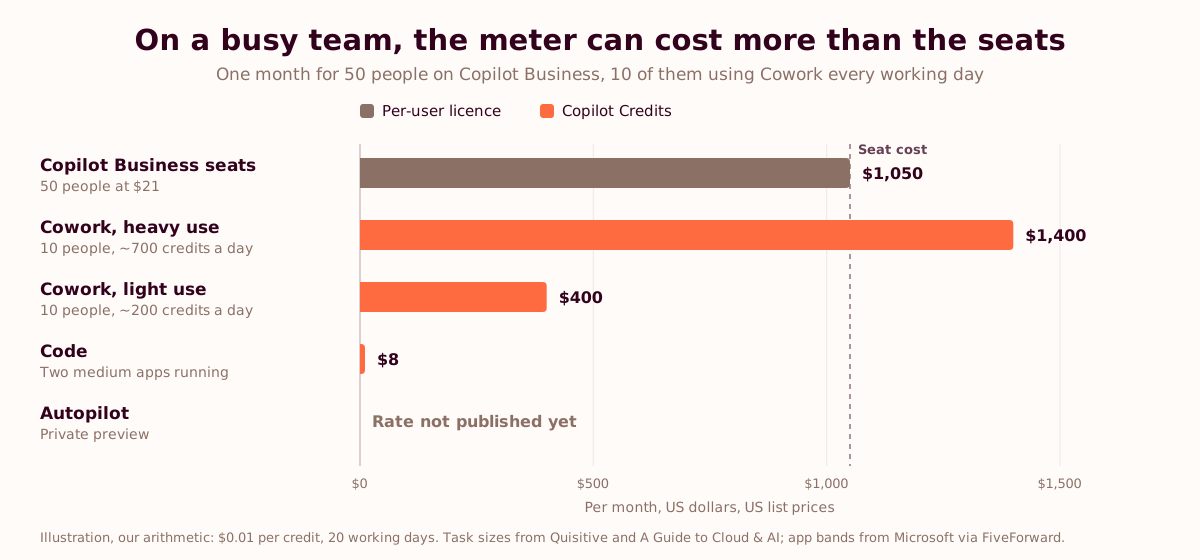
Our arithmetic, at $0.01 a credit on pay-as-you-go, with task sizes from the bands above. Your mix will differ. Two things stand out anyway. On a team that uses Cowork for heavy work every day, the meter costs more than the seats. And Code, the tab that sounds expensive, is the cheap one to run.
For the finance side, our guide to monitoring AI spend across Claude, ChatGPT, Copilot and Gemini covers the dashboards, and how to measure AI ROI for a UK business case covers what to put in front of the CFO. If you're comparing vendors, ChatGPT vs Claude plans for companies has the other two price lists.
Before the meter starts
Know what the work costs today, before Microsoft starts counting.
Twenty minutes with Toni or Meera. Bring your Copilot usage report and the workflow that eats the most hours. You'll leave with the workflow to pilot first, the baseline to take before Frontier goes live, and a rough credit budget for it. We're tool-agnostic, so nobody on the call is selling you a licence.
Book a 20-minute call →What the meter changes for the next budget conversation
For almost three years, Copilot was a flat fee. Whether it was worth the money could wait for the renewal, and at renewal time the answer often came down to a usage chart and a feeling.
With a meter, the question comes up on every task. Moor Insights reads the change as margin repair and market expansion, and calls it the right call. We agree, for a less flattering reason: a price per task forces a baseline. A $3 Cowork task is cheap if the tender section it drafted used to take two hours. Without the section's old timing, the $3 is just a number on an invoice.
So the bid manager who times the next tender response, from the documents arriving to the final submission, before anyone opens Cowork, will have the answer before the renewal conversation starts.
Frequently asked questions
What is the new Microsoft Copilot app?
The new Microsoft Copilot is the rebuilt Copilot app Microsoft announced on 25 September 2026. It has three tabs: Home, where Chat and Cowork sit together with full Word, Excel and PowerPoint inside; Code, which builds apps, dashboards and trackers from a plain-language description; and Autopilot, a persistent agent with its own identity that keeps working without a prompt. The per-user licence covers everyday use, while Cowork, Code and Autopilot are billed in Copilot Credits.
What is Copilot Autopilot, and what happened to Microsoft Scout?
Autopilot is Microsoft's persistent agent for work. Microsoft introduced it on 2 June 2026 as Scout, a desktop app for Windows and Mac, then renamed it and moved it into the cloud on 25 September 2026. You give it a name, a role and a goal, and it watches channels, follows up on threads, runs recurring work and resumes projects days later, under its own Entra identity in your Microsoft 365 tenant. The Scout desktop app moves into maintenance mode.
What can you build with Copilot Code?
Copilot Code builds small software from a plain-language description: apps, trackers, interactive dashboards over business data, automations and desktop widgets. It uses the same underlying technology as GitHub Copilot and builds in a sandbox. Apps can be hosted on Copilot Managed Runtime inside your Microsoft 365 tenant, with Entra sign-in, tenant policies and an inventory in the Microsoft 365 admin center. Building and running apps draws Copilot Credits.
When is the new Copilot available?
Microsoft said on 25 September 2026 that Home and Code would start rolling out to its Frontier early-access program in the coming weeks, and that Autopilot would expand to private preview at the end of September, with broad availability planned by the end of 2026. Copilot Managed Runtime entered public preview on 25 September. Frontier features are preview and can change before general availability.
How much does the new Microsoft Copilot cost?
At US list prices on an annual commitment, Microsoft 365 Copilot costs $30 per user per month, and Microsoft 365 Copilot Business, for up to 300 users, costs $21, discounted to $18 until 31 December 2026. The licence covers Chat and Copilot in Word, Excel, PowerPoint, Outlook and Teams. Cowork, Code, Autopilot and the frontier models Fable and Astra are billed separately in Copilot Credits, at $0.01 per credit on pay-as-you-go.
Is Copilot Cowork included in the Microsoft 365 Copilot licence?
No. Since 16 June 2026, Cowork tasks draw Copilot Credits on top of the licence. Credit use depends on the model, the context the task pulls in, the tools it calls and how long it runs. A Guide to Cloud & AI estimates a light task at about 100 to 300 credits ($1 to $3) and a heavy one at 700 credits or more. Users can type /cost in Cowork to see what a task used.
How do I join the Microsoft Frontier program?
An admin with the AI Admin, Security Admin or Office Apps Admin role signs in to the Microsoft 365 admin center, opens Copilot, then Settings, selects View all, searches for Frontier and selects Copilot Frontier. The tenant needs paid Copilot licences and modern billing, and only licensed users see Frontier features. Microsoft says features can take up to three hours to appear after the opt-in.
Is the new Copilot safe for company data?
The new Copilot runs its apps and agents inside the Microsoft 365 tenant: Code apps run on Managed Runtime with Entra authentication and tenant policies, and each Autopilot works under its own Entra identity with scoped credentials, audit and Purview. The exposure sits in permissions and oversight, because an agent reads whatever its identity can reach, and each model you enable comes with its own data-processing terms. The UK NCSC's August 2026 interim guidance on agentic AI lists four agent-specific risks worth checking against any pilot.
Should we switch on Autopilot now?
We wouldn't point it at sensitive work yet. Microsoft says Autopilot's admin controls for permissions, audit and memory will come later, and its pricing isn't public. Start with Home and Cowork on one measured workflow, open Code with an app policy, and give Autopilot a written job description and a narrow scope once the controls ship.
Sources and further reading
- Microsoft, "Introducing the new Copilot with Home, Code and Autopilot", Official Microsoft Blog, 25 September 2026
- Microsoft, Copilot Managed Runtime announcement, Microsoft Copilot Blog, and What is Microsoft Copilot Managed Runtime (preview), Microsoft Learn
- Microsoft Learn, Get started with the Microsoft Copilot Frontier Program
- Microsoft Learn, Usage-based billing and cost management for Copilot Credits and Check your credit usage for Cowork tasks with /cost
- Microsoft, Copilot Credits Guide, September 2026 (PDF) and Microsoft Copilot plans and pricing
- Microsoft Partner Center, September 2026 announcements
- Microsoft Investor Relations, FY26 Q4 results, July 2026
- Kathleen Hogan, "What we've learned from Microsoft's own AI transformation", Official Microsoft Blog, 17 September 2026
- National Cyber Security Centre, Managing the cyber risk of agentic AI, August 2026
- Launch coverage and analysis: GeekWire, VentureBeat, Computerworld, Moor Insights & Strategy, Empowering.Cloud, 2tolead
- Pricing analysis: FiveForward, Quisitive, A Guide to Cloud & AI, Office 365 for IT Pros
- Toni Dos Santos, Teach Them to Drive: The AI Adoption Playbook for Teams