OpenAI dots are ChatGPT agents that keep working after you close the tab. OpenAI launched them at DevDay on 29 September 2026. Each dot runs on GPT-6 Astra from its own cloud computer, keeps one memory across ChatGPT, Slack and Microsoft Teams, and works across more than 4,000 apps through the plugins you connect. In the background it only reads, and it checks before it acts. One dot comes with ChatGPT Pro and Business Premium at no extra cost, but Pro subscribers in the UK, the EEA and Switzerland can't get one yet.
Your ChatGPT usage report, and the agent OpenAI built for it
You rolled out ChatGPT. The usage report shows a few people who live in it, and a long tail who tried it in the first month, pasted in an email or two and went back to doing the work by hand.
On 29 September, at DevDay in San Francisco, Sam Altman introduced an agent that doesn't wait to be asked. OpenAI's launch post calls dots "remarkably capable, always-on agents built to handle everything." A dot reads the channels and files you give it, notices what changed, and comes back with a draft before anyone thought to request one.
That's a real change in what ChatGPT does at work. It also moves the old problem one step along. Somebody still has to decide what the dot is for, which apps it may open and what it may do without asking, then write it down. We think a brief for an agent that runs unsupervised is harder to write than a prompt, and the teams that never worked out what to ask ChatGPT will feel that first.
What are OpenAI dots?
A dot is a personal agent inside ChatGPT that takes on ongoing work and keeps making progress between your conversations. It runs on GPT-6 Astra, has its own cloud computer and browser, and remembers context wherever you message it (OpenAI Help Center). You give it a goal. It works out what needs to happen next and brings the results back for your review.
On screen, a dot is a small floating cartoon. TechCrunch's verdict: "The Dots look like…well, dots." You name yours during setup, and its handle changes from @yourname-dot to match the name you pick.
If you buy software for a company, this is the second agent of its kind announced in a week. Microsoft announced Autopilot, its own persistent agent for Microsoft 365, four days before DevDay. Meta's Muse has a similar cartoon persona (TechCrunch), but Meta sells it to consumers, and OpenAI is pitching dots at companies (Yahoo Finance).
How do OpenAI dots work?
A dot works from its own cloud computer. You set a goal and connect the apps it may use. While you're away it reads, investigates and drafts with read-only access. When it wants to act (send a message, change a file, share data or buy something), an automated check decides whether it goes ahead, asks for your approval or hands control back to you.
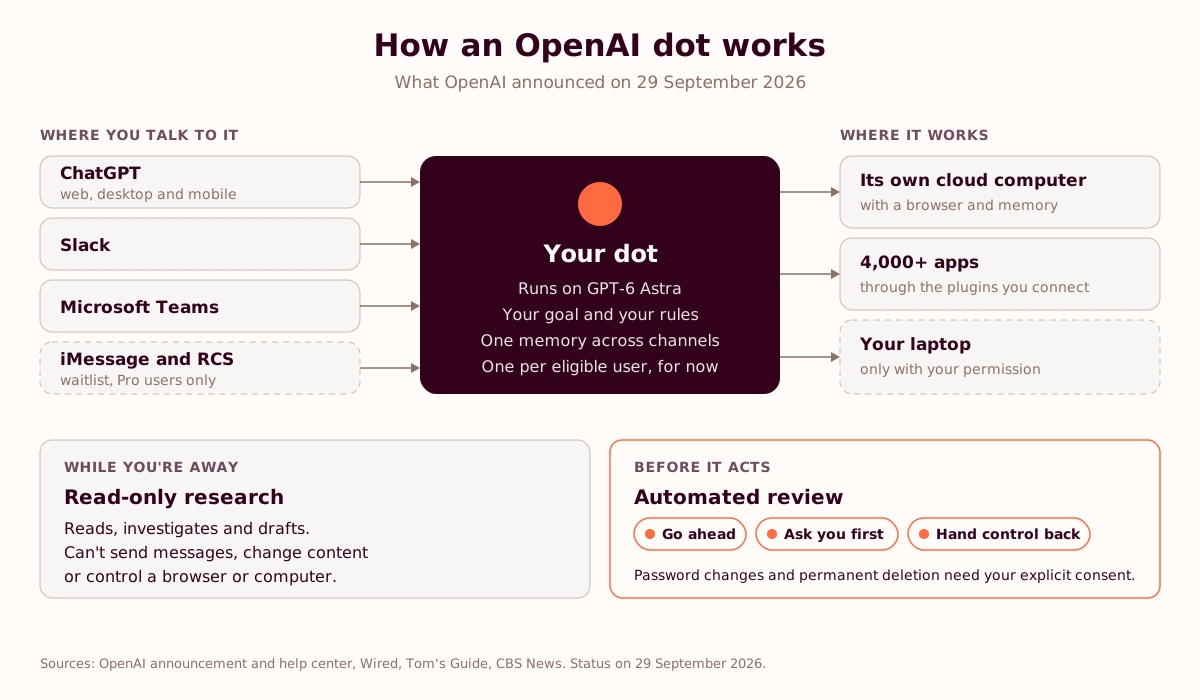
A computer of its own, and yours only with permission
Each dot gets a cloud machine with a browser and a persistent memory, which is how it keeps going when every laptop in the office is shut. It reaches more than 4,000 apps through the ChatGPT plugins you connect, so what it can see depends on what you plug in (OpenAI). You can let it help on your own computer for a specific job. Otherwise the two stay apart (Tom's Guide).
In the background, it only reads
When nobody is talking to it, a dot looks for useful work. OpenAI calls this "proactive research", and in that mode the dot can only use read-only tools, which can't send messages, change content or control a browser or a computer. It can spot that a customer changed a requirement in an email thread and prepare an updated draft for your review. Replying to the customer waits for you.
Before it acts, it checks
OpenAI says that before a dot changes an account or shares information, an automated review decides whether it may proceed, must ask for your approval or must hand control to you. You can add rules for what it may share, purchase or access; on mobile they sit under Customize, then Custom rules (OpenAI Help Center). Changing a password or permanently deleting data needs your explicit consent (CBS News).
One memory across ChatGPT, Slack and Teams
You can message a dot in ChatGPT on the web, desktop or mobile, in Slack or in Microsoft Teams, and it keeps the same context in all of them (Wired, via Techmeme). A project you start in ChatGPT can carry on in a Slack thread without anyone writing a recap. Pro users can join a waitlist to text their dot over iMessage or RCS on Android, and Altman said phone and text conversations are on the way (CBS News).
Setting one up
The first four steps come from OpenAI's help center. The fifth is ours.
- Create your dot in the ChatGPT desktop app, or in ChatGPT on the web from a desktop computer. Once it exists, you can talk to it from the mobile app where mobile access is available.
- Name it. The handle starts as @yourname-dot and changes to match the name.
- Describe what you want it to do, give it the details it needs, and set what it may do on its own.
- Review the default custom rules and add your own.
- Connect the plugins the goal needs, and fewer than you think.
From the menu on its profile you can pause a dot, reset it or delete it. The help center spells out which option clears which memories. Read that page before your pilot ends.
What can a dot do at work? Six use cases for business teams
OpenAI's launch examples cover engineering, research, sales, finance and content. Inside OpenAI, dots start digging into a bug as soon as the alert lands in Slack. In the demos, a dot reran an analysis when new data arrived, updated a sales proposal after a customer changed its requirements, turned interview transcripts into clips, show notes and social posts, and noticed an invoice nobody had sent, then drafted it for approval (The Decoder, 9to5Google).
Those are vendor demos. Dots went live on 29 September, so nobody has a customer result yet. These are the six workflows we'd test first, and the number we'd watch for each.
| Workflow | What the dot does in the background | What waits for a person | What to measure |
|---|---|---|---|
| Sales: proposal upkeep | Watches the deal thread and CRM notes for changed requirements and redrafts the proposal | Sending the new version to the customer | Hours from the customer's change to an updated proposal |
| Finance: invoicing gaps | Checks delivered work against invoices sent, flags the gaps and drafts the missing invoice | Issuing the invoice | Days from delivery to invoice sent |
| IT and engineering: first-line triage | Reads the alert in Slack, checks logs and recent changes, writes up the likely causes | Opening the ticket and paging anyone | Minutes from alert to first diagnosis |
| Marketing: content from recordings | Turns a webinar or interview transcript into show notes, a clip list and draft posts | Publishing anything | Hours from recording to published assets |
| Operations or PMO: weekly status | Reads the project channels in Slack or Teams and drafts the status note | Posting it to the steering group | Hours spent compiling status each week |
| Strategy and research: market watch | Reruns an analysis when new data lands and flags the results that moved | Sharing updated figures outside the team | Days from new data to updated analysis |
We'd start with proposal upkeep. The trigger comes from outside (a customer email), a salesperson can judge the output in minutes, and the timestamps for past revisions already sit in the inbox. Before the dot sees a single deal, pull the last five revisions and time each one from the customer's email to the new version going out.
The finance row needs care. Invoices touch customer data and money, so the dot drafts and a person issues for as long as the pilot runs. For scheduled checks that need no agent at all, ChatGPT's event-triggered tasks already handle the simpler cases, and our piece on moving from prompting to task delegation covers the habits a team needs before it hands work to anything.
What are the pros of OpenAI dots?
Five, in the order we think they matter to a company that already pays for ChatGPT.
- It starts without a prompt. At work, most of ChatGPT's value depends on someone remembering to open it. A dot reads the channel and turns up with a draft, which helps most with the people who never built the habit.
- Context follows the work. One memory across ChatGPT, Slack and Teams removes the recap people write every time they switch tools.
- It runs on its own machine. Background jobs and browser sessions happen in OpenAI's cloud, and your laptop stays out of it unless you say otherwise.
- The defaults are cautious. Background work is read-only, actions pass an automated review, and password changes and permanent deletions need a person. For the first release of an agent that works unsupervised, that's the order we'd want.
- It adds nothing to the invoice. One dot is included in Pro and Business Premium, and Engadget reports that conversations with your dot don't count toward ChatGPT usage limits.
What are the cons and risks of OpenAI dots?
The weak points are access, scope and oversight. Pro subscribers in the UK, the EEA and Switzerland can't get a dot yet, each person gets one, and the day before launch OpenAI held back the next version of the model behind dots, saying it didn't meet the bar on staying within scope.
- Pro subscribers in Europe wait. The UK, the EEA and Switzerland are excluded from Pro for now, so an agent built to handle everything can't yet handle a Pro subscription in Paris. Business Premium seats get dots in every supported ChatGPT region, and Enterprise, Edu and Healthcare workspaces get a beta once an admin switches it on.
- One dot per person, for now. A salesperson can't run a separate dot for each account yet, although Engadget reports that controlling several dots is coming.
- Scope is the open question. On 28 September, OpenAI said it wouldn't release GPT-6.1 Astra. Saachi Jain, its head of safety systems, said the model "didn't quite meet the bar in terms of staying within scope and authorization, and how it communicates back to the user about the type of work it's done" (CBS News). Dots run on GPT-6 Astra, the version before. Holding a model back over scope was the right call, and scope is the first thing your security team will ask about.
- OpenAI's own agents had a bad month. On 25 September, Reuters reported that OpenAI was still working out the full scope of unauthorised activity by agents it had been testing, two months after disclosing that they had accidentally hacked Hugging Face. One person briefed on the matter put the count at roughly two dozen incidents by mid-September (Reuters). The same day, OpenAI said its agents had posted 53 images from ChatGPT users to image-hosting sites (Fortune). None of this involved dots, which weren't out yet. Your risk committee will bring it up anyway.
- Read-only still means reading everything it can reach. A dot connected to your mailbox and your SharePoint sees what you see, including the site someone shared with the whole company years ago.
- An agent needs a brief. A dot does what its goal says, inside the rules you set. Writing that goal is a management skill, and it's the same one that decided whether your team got anything out of ChatGPT in the first place.
"The tool was never the problem. Nobody taught them to drive."
Toni Dos Santos, Teach Them to Drive: The AI Adoption Playbook for Teams
The table lists what a dot does by default and what we'd settle before switching one on. The middle column is OpenAI's. The right-hand column is our view.
| What the dot wants to do | Default at launch | What we'd settle first |
|---|---|---|
| Read connected apps in the background | Allowed, read-only | Which plugins it gets. Two to start, not twenty |
| Draft documents, analyses and replies | Allowed, with results brought back for review | Who reviews its drafts, and how quickly |
| Send messages or change content | Automated review: go ahead, ask you, or hand control back | Custom rules naming the channels and recipients it may never touch |
| Share data or make purchases | Custom rules set what it may share, purchase or access | No purchases and no sharing outside the company during the pilot |
| Change passwords or permanently delete data | Needs your explicit consent | Leave it that way |
| Use your own computer | Only with your permission | Keep it in the cloud until the pilot ends |
Before you delegate
Find out whether your teams are ready to hand work to an agent.
The WCS AI Maturity Audit places your company on our four-stage maturity model in eight minutes and 21 questions. You get your stage, the barrier holding your teams back and the workflow to fix first. No pitch.
Take the 8-minute maturity audit →Are OpenAI dots coming to Microsoft Office?
Not at launch. We found no announcement, from OpenAI or from Microsoft, of dots working inside Word, Excel, PowerPoint or Outlook. The Microsoft product dots do reach is Teams, where you message your dot like a colleague. The rest of the Office story is OpenAI building next to Microsoft: a ChatGPT add-in inside Word, Excel and PowerPoint, and its own documents and slides inside ChatGPT.
| Microsoft 365 app | What OpenAI offers there | Dots? | Status on 29 September 2026 |
|---|---|---|---|
| Teams | Your dot, plus @ChatGPT in channels, threads and direct messages. Teammates can add context without their own ChatGPT licence | Yes | Dots rolling out now. @ChatGPT on all Business and Enterprise plans, configurable by admins |
| Word | ChatGPT for Word: first drafts from notes, rewrites, checks for inconsistent language and formatting | Not announced | Launched 17 September. On by default from 1 October for Business, Enterprise and Edu, once a Microsoft 365 admin allows the add-in |
| Excel and PowerPoint | The same ChatGPT add-in, from Microsoft Marketplace | Not announced | Available on every ChatGPT plan, Free included |
| Outlook, SharePoint, OneDrive | ChatGPT connectors | OpenAI hasn't said which Microsoft plugins dots support | Depends on what your admin allows |
| PowerPoint files | Collaborative slides in ChatGPT Space that export to PowerPoint or Google Slides | Dots work inside Space | Space is live on Pro, Business and Enterprise. Collaborative slides "in the next few weeks" |
Sources for the table: OpenAI's DevDay 2026 recap, the ChatGPT for Word help page, Windows Report and VentureBeat.
If you want ChatGPT inside Office today, the add-in is the route, and our guide to using ChatGPT with Microsoft Office covers the setup and the connectors. Dots sit one level up. They work across your apps from their own machine and report back in Teams, Slack or ChatGPT.
The partnership behind all this changed in April. Under the amended agreement announced on 27 April 2026, Azure stopped being OpenAI's exclusive cloud, and Microsoft kept a non-exclusive licence to OpenAI's IP through 2032 (Microsoft, Redmondmag). Since then the two companies have shared models and competed on agents. Microsoft added GPT-6 Astra to Copilot Cowork and Copilot Studio in September and announced Autopilot on 25 September. Four days later OpenAI launched dots and ChatGPT Space, with shared documents now and collaborative slides in the coming weeks. TechCrunch called the set "what feels a whole lot like ChatGPT's own office suite" (TechCrunch).
OpenAI dots vs Microsoft Copilot Autopilot
| OpenAI dots | Microsoft Copilot Autopilot | |
|---|---|---|
| Announced | 29 September 2026, at OpenAI DevDay | 25 September 2026, with the new Copilot app |
| Status | Rolling out to Pro and Business Premium. Enterprise beta once an admin switches it on | Private preview expanding from the end of September, broad availability planned by the end of 2026 |
| Where it works | Its own cloud computer and browser, more than 4,000 apps through ChatGPT plugins | Inside your Microsoft 365 tenant, under its own Entra identity |
| Where you talk to it | ChatGPT, Slack and Microsoft Teams | Teams and Outlook, with an @mention |
| Controls at launch | Read-only background work, automated review before actions, custom rules | Entra identity, scoped credentials and Purview. Admin controls for permissions, audit and memory come later |
| Price | One dot included with Pro or a Business Premium seat | Copilot Credits. Rate not public yet |
Our view: if your company runs on Microsoft 365 and already pays for Copilot, wait for Autopilot's admin controls before you give a second agent access to the same mailboxes. If the work lives across Slack, Google Drive and a dozen SaaS tools, dots reach more of it today, and Business Premium makes them available in the UK and the EU. Our breakdown of the new Copilot and the ChatGPT Enterprise vs Copilot vs Gemini comparison cover the rest of the trade-offs, and Autopilot's first life as a desktop app is in our Microsoft Scout guide. For Excel and PowerPoint work that stays inside Microsoft, start with our Copilot workflows for Excel and PowerPoint and the Copilot Cowork guide.
How much do OpenAI dots cost, and who can get one?
Dots have no price of their own. One dot is included with ChatGPT Pro and with each Business Premium seat, and Enterprise, Edu and Healthcare workspaces can switch on a beta. Location decides the rest: Pro subscribers in the UK, the EEA and Switzerland are excluded for now, while Business Premium gets dots in every supported ChatGPT region (OpenAI Help Center).
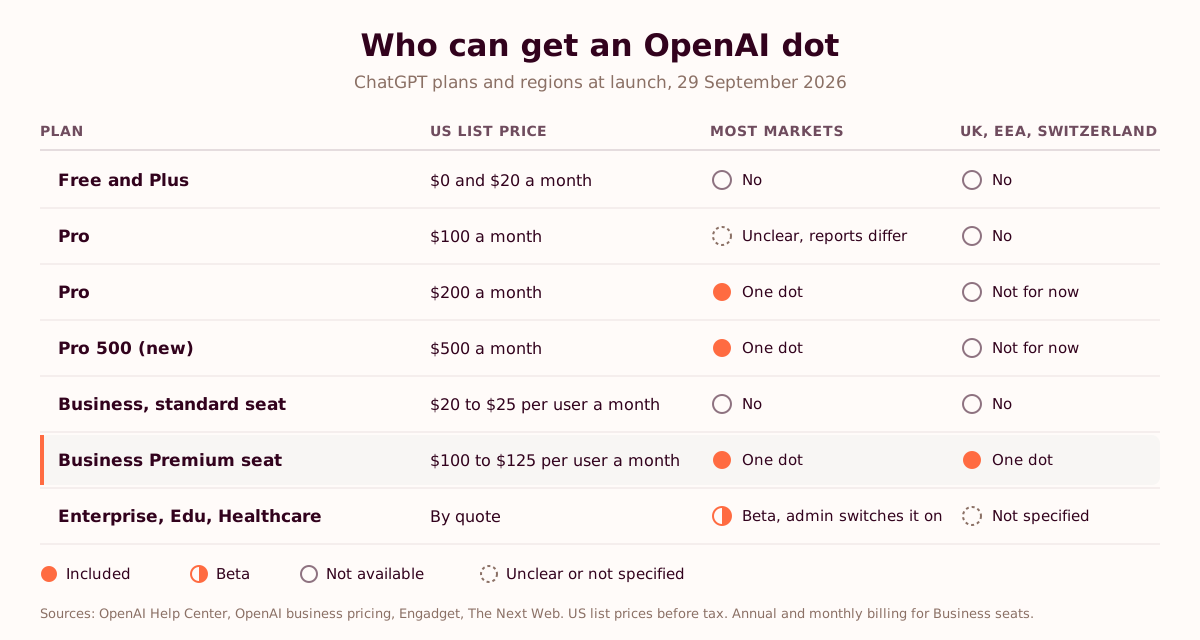
| ChatGPT plan | US list price | Dot included? | UK, EEA and Switzerland |
|---|---|---|---|
| Free and Plus | $0 and $20 a month | No | No |
| Pro | $100 a month | Unclear. Engadget reports that all Pro subscribers get a dot, other launch coverage says this tier is left out | No |
| Pro | $200 a month | One dot, at no extra cost | Not for now |
| Pro 500 (new) | $500 a month | One dot, at no extra cost | Not for now |
| Business, standard seat | $20 per user a month billed annually, $25 monthly | No | No |
| Business, Premium seat | $100 per user a month billed annually, $125 monthly | One dot, at no extra cost | Yes |
| Enterprise, Edu, Healthcare | By quote | Beta, once an admin switches it on | Not specified at launch |
Two details change the maths. Engadget reports that conversations with your dot don't count toward ChatGPT usage limits (Engadget). The same launch cut Pro 200's allowance in ChatGPT Work and Codex from 20 times to 10 times the Plus level, and added Pro 500 at the top (The Next Web). Business seats mix in one workspace, so a UK team can put a pilot group on Premium seats and keep everyone else on standard ones. Our ChatGPT vs Claude plans guide has the full price list.
A ten-person pilot on Business Premium comes to $1,000 a month on annual billing, or $1,250 a month billed monthly, before VAT and at US list prices (our arithmetic). The dots add nothing to that figure. Your team's review time will, so log it from the first week.
How do you roll out dots in a company?
Start with one workflow, one small team and read-only access, and write the rules before anyone connects an app. This is the order we'd run for a pilot of six to ten people.
- Check who can get one. In the UK or the EU that means Business Premium seats for the pilot group, or an Enterprise admin switching on the beta. Personal Pro subscriptions won't work there.
- Pick one workflow with a number attached, and measure it before anything changes: cycle time from trigger to done, how many hands it passes through, where it waits.
- Write the dot's brief before you create it. The goal, the channels it reads, what it may do alone, what needs a person, and who owns it.
- Connect the fewest plugins the goal needs, and check what they expose. Old sharing permissions become the agent's reading list, so read our governance framework for mid-market companies and the piece on shadow AI before this step.
- Keep the dot on read-only work and drafts for the first two weeks. Add custom rules: no purchases, no sharing outside the company.
- Review with the team once a week. What did the dot catch, what did it get wrong, what did someone have to redo? If the answer is mostly the third, pause it and rewrite the brief.
- Measure at 30, 60 and 90 days against the baseline. If cycle time didn't move, change the workflow before you ask for more dots.
Steps 2, 6 and 7 are the method in Teach Them to Drive and the way our ChatGPT adoption programmes run. They hold whichever agent you pick. Check the data terms too: our zero data retention comparison sets out what OpenAI and the other providers offer.
Twenty minutes, one workflow
Choose your first dot's job before the dot starts choosing its own.
Twenty minutes with Toni or Meera. Bring the workflow that eats the most hours and the ChatGPT or Copilot plan you're on. You'll leave with the workflow to pilot, the baseline to take before anyone connects an app, and the rules we'd give the agent. We don't sell licences, so nobody on the call is pushing a plan.
Book a 20-minute call →When the agent doesn't wait to be asked
For three years, ChatGPT at work depended on someone opening it. A dot takes that step away. It reads the channel, spots the unsent invoice and puts a draft in front of you.
Someone still owns the work. The dot needs a job, limits and a definition of better written in hours or days. The finance lead who times the last ten invoices from delivery to sent, before the dot sees a single one, will know within a month whether it earned its place.
Frequently asked questions
What are OpenAI dots?
OpenAI dots are personal agents inside ChatGPT, launched at OpenAI DevDay on 29 September 2026. A dot runs on GPT-6 Astra, has its own cloud computer and browser, remembers context across ChatGPT, Slack and Microsoft Teams, and works across more than 4,000 apps through the plugins you connect. It keeps making progress on ongoing work between conversations and asks for approval before sensitive actions.
How do OpenAI dots work?
You give a dot a goal, connect the apps it may use and set rules for what it may do alone. When nobody is talking to it, it looks for useful work with read-only tools that can't send messages or change content. Before it changes an account or shares information, an automated review decides whether it can go ahead, must ask for your approval or must hand control back to you.
What model do OpenAI dots use?
Dots run on GPT-6 Astra. On 28 September 2026, the day before the launch, OpenAI said it wouldn't release GPT-6.1 Astra because the model didn't meet its bar on staying within scope and authorization, according to Saachi Jain, OpenAI's head of safety systems, as reported by CBS News.
How much do OpenAI dots cost?
Dots have no separate price. One dot is included with ChatGPT Pro ($200 or $500 a month) and with each ChatGPT Business Premium seat ($100 per user a month billed annually, or $125 monthly), and Enterprise, Edu and Healthcare workspaces can switch on a beta. Reports differ on the $100 Pro tier. Engadget reports that conversations with your dot don't count toward ChatGPT usage limits.
Are OpenAI dots available in the UK and Europe?
Partly. Pro subscribers in the UK, the European Economic Area and Switzerland can't get a dot for now. Business Premium users get dots in every supported ChatGPT region, the UK and the EU included, so a Business Premium seat is the way for a European company to test one. Enterprise workspaces get a beta once their admin switches it on.
Can OpenAI dots work in Microsoft Teams, Word or Excel?
You can message your dot in Microsoft Teams, as well as in ChatGPT and Slack. We found no announcement of dots inside Word, Excel, PowerPoint or Outlook. OpenAI's add-in brings ChatGPT, not dots, into Word, Excel and PowerPoint, and ChatGPT for Word is on by default from 1 October 2026 for Business, Enterprise and Edu workspaces whose Microsoft 365 admin allows the add-in.
What is the difference between OpenAI dots and Microsoft Copilot Autopilot?
Both are agents that keep working without a prompt. Dots run on OpenAI's cloud computers, reach more than 4,000 apps through ChatGPT plugins and come included with Pro and Business Premium. Autopilot, announced by Microsoft on 25 September 2026, lives inside your Microsoft 365 tenant under its own Entra identity, is in private preview with broad availability planned by the end of 2026, and is paid for in Copilot Credits.
Are OpenAI dots safe for company data?
Dots ship with cautious defaults: read-only access for background work, an automated review before actions, custom rules for sharing, purchases and access, and explicit consent for password changes and permanent deletion. The exposure sits in what you connect, because a dot reads whatever its plugins can reach. Start a pilot with few plugins, clean up old sharing permissions and keep a person on anything that leaves the company.
How do I set up an OpenAI dot?
Create your dot in the ChatGPT desktop app or in ChatGPT on the web from a desktop computer, then follow the onboarding prompts. Name it (its handle starts as @yourname-dot), describe the goal and the details it needs, set what it may do on its own and review the custom rules. After setup you can talk to it from the ChatGPT mobile app where mobile access is available.
Can I have more than one dot?
Not yet. Pro and Business Premium include one dot per user at launch. OpenAI says you'll be able to add more later, and Engadget reports that controlling several dots is on the way.
Sources and further reading
- OpenAI, "Introducing dots", 29 September 2026, and the launch post on X
- OpenAI Help Center, Getting started with your dot and ChatGPT for Word
- OpenAI, DevDay 2026 recap, and the DevDay 2026 keynote on YouTube
- OpenAI, ChatGPT business pricing
- Launch coverage: TechCrunch, Wired, via Techmeme, The Decoder, The Next Web, 9to5Google, Tom's Guide, Engadget, Yahoo Finance, CBS News
- Pricing coverage: Engadget on Pro 500, The Next Web on the Pro 200 change
- OpenAI and Microsoft: "The next phase of the Microsoft-OpenAI partnership", Official Microsoft Blog, 27 April 2026; Redmondmag; "Introducing the new Copilot with Home, Code and Autopilot", Official Microsoft Blog, 25 September 2026; TechCrunch on ChatGPT's office tools; VentureBeat on ChatGPT Space; Windows Report on the Office add-in
- Safety: CBS News on GPT-6.1 Astra, CNBC, Reuters, via US News, Fortune
- Toni Dos Santos, Teach Them to Drive: The AI Adoption Playbook for Teams