Copilot gets better when the ask gets better. Microsoft's own help pages say a strong Copilot prompt has four parts: a goal, context, a source and expectations. Its 2026 Work Trend Index found that 86% of AI users at work already treat AI output as a starting point. Five habits close the gap, and none of them is a setting: brief in four parts, point Copilot at your files with /, cast a role and show an example, make it critique its own draft, and work in rounds.
You type one line into Copilot. It comes back with three confident paragraphs that could describe any company on earth. You rewrite them yourself and quietly file Copilot under overrated.
Copilot can't see what's in your head. It works from the conversation, plus whatever work content it finds or you point it at. Microsoft's guide to writing a great prompt says as much: Copilot is limited to the current conversation, so detail decides the answer. Everything below is something you type. Nothing needs an admin, with one licence caveat flagged in tip 2.
The five fixes
- Brief in four parts. Goal, context, source, expectations: Microsoft's own prompt framework. Only the goal is required. The other three carry the quality.
- Point it at your files. Type / in Copilot Chat to attach a file, meeting, email or person, so the answer uses your numbers.
- Cast the role, show the standard. Say who Copilot is playing and who's reading, then paste one example of the output you want.
- Make it the first critic. Ask what it assumed and what's weak, then ask for version two.
- Work in rounds. Brief, shape, critique, then your own check. The first answer is round one.
1. Brief Copilot in four parts: goal, context, source, expectations
Microsoft's guidance for Microsoft 365 Copilot splits a prompt into four parts. The goal is what you want. The context is why you need it and who it's for. The source is which files, emails, meetings or data Copilot should use. The expectations are what the answer should look like: length, format, tone. Microsoft says only the goal is required. The other three are where the quality comes from.
Other versions circulate online, persona, task, context and format being the popular one. Microsoft's is the one to learn. It's written into Copilot's own help pages, and it has a slot for sources, the part most people skip.
Weak ask:
Summarise the project.Strong ask, same request:
Summarise where the Alpha project stands for our COO, who decides on Friday whether to add budget. Use /Alpha status report and the /Alpha steering meeting from Tuesday. Five bullets, each with the risk, the owner and the next step. Under 200 words, plain English.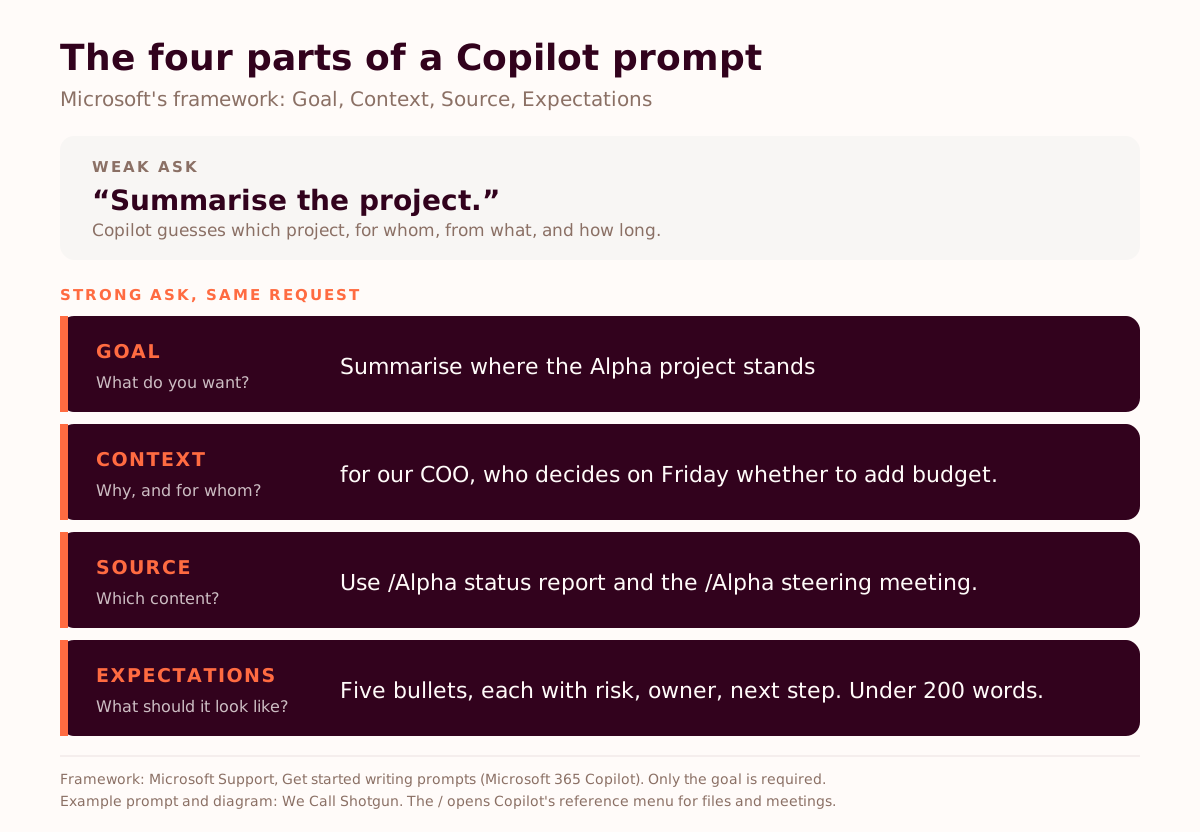
The four parts double as a diagnosis. When an answer disappoints, find the missing part before you blame the tool.
| What you got back | Missing part | Add this |
|---|---|---|
| Generic text that could fit any company | Context | Who it's for and what they'll decide with it |
| Invented or outdated figures | Source | A / reference to the file, meeting or email to use |
| Right content, wrong length or format | Expectations | Word count, bullets or table, tone |
| A tidy answer to the wrong question | Goal | One sentence on the outcome you want |
Handing Copilot Cowork a whole task instead of a chat request? The same brief applies, plus a line on how you'll check the result. That's the Delegation Brief.
2. Point Copilot at your files instead of describing them
Type / in Microsoft 365 Copilot Chat and a menu opens. Pick a file, a meeting, an email or a person, and Copilot grounds its answer in that content, according to Microsoft's support page on referencing files. Without a reference, Copilot decides for itself which sources to search. Sometimes it guesses right.
The gap has a number. In Templafy's 2026 survey of 2,000 UK and US knowledge workers, 42% said their AI can't reach approved company content (our analysis). A / reference closes it one prompt at a time, without waiting for an IT project.
Three prompts to copy. The first is Microsoft's own, from its catch-up guide for Copilot Chat:
Summarize messages from Sam over the past two weeks. Call out any important details, like deliverables, due dates, and action items for me.Recap /Weekly ops meeting. List the decisions, who owns each one and the deadline. Then list the questions nobody answered.Using /Q3 pricing proposal and my emails with /Client contact, list every commitment we made on price or delivery dates, with the date of each. Flag anything that contradicts the proposal.The licence caveat. Referencing meetings, emails and people needs a Microsoft 365 Copilot licence and Work IQ switched on in the chat. With Work IQ off, the / menu shows files only, and without the licence Copilot Chat works from files you upload. For a project with dozens of documents, a Copilot Notebook grounds answers in up to 100 references you choose (our Notebooks guide).
3. Cast the role and show the standard
Tell Copilot who it's playing and who's reading. Then paste an example of what good looks like. Microsoft's WorkLab guide to prompting makes the same point: large language models work by imitation, so give examples of the output you want.
You're a project manager writing to a CFO who thinks this project is over budget. Write a five-line update from /Alpha status report that answers the cost question first.Here's last month's board update, which the board liked: [paste]. Write this month's in the same structure, length and tone, using /October figures.In 30 minutes I'm meeting our finance director to ask for budget for [project]. They'll push back on cost. Give me the three strongest arguments, the objections to expect and a one-line answer to each.One real example beats five adjectives. "Concise, punchy, professional" means something different to everyone in the room. Last month's update that the board liked means one thing.
Free, one email
Forty prompts, before and after.
The Prompt Pack has 40 before-and-after AI prompts across five functions. It's part of the Driver's Pack, eleven free resources from Teach Them to Drive, including the Painful Tuesday inventory and the four metrics worksheet. We send the links once. No drip sequence, no phone call.
Get the Driver's Pack →4. Make Copilot critique its own draft before anyone else sees it
After the first draft, ask Copilot what it assumed, what's weak and what's missing. Then ask for version two. It's one follow-up, and it catches part of what your reader would have caught.
Jaime Teevan, Microsoft's chief scientist, likes to ask Copilot to explain how it arrived at a response, according to Microsoft's WorkLab guide. Teevan's comparison: "It's similar to how math teachers ask students to show their work."
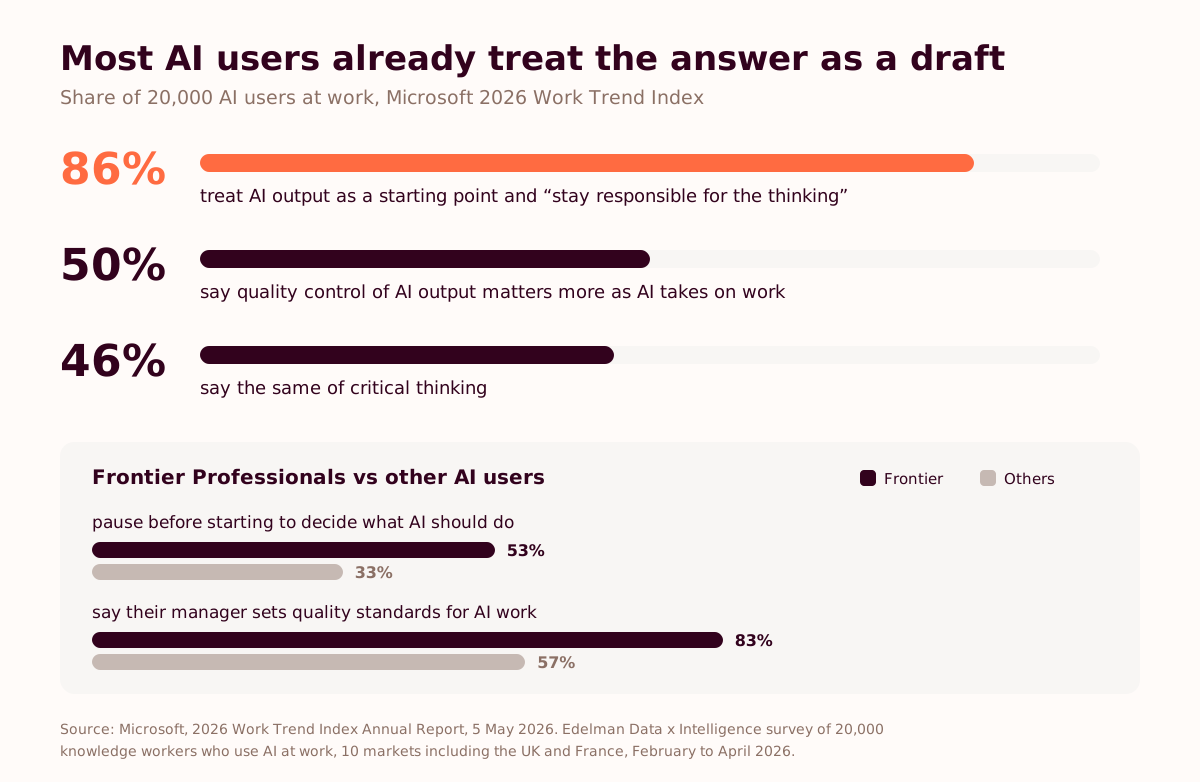
AI users already rank this as the job. In Microsoft's 2026 Work Trend Index, quality control of AI output topped the list of human skills that matter more as AI takes on work (50%), ahead of critical thinking (46%).
Before I use this: list the assumptions you made, the claims that need a source, and the weakest paragraph. Then write version two fixing all three.Review this project plan as a sceptical PMO lead. Flag unrealistic dates, missing dependencies, people booked twice, and anything stated as fact without evidence.Which sentences in your answer aren't supported by the files I referenced? Quote each one and say what's missing.Self-critique has a ceiling. Copilot can miss its own errors, and it can't know what your COO knows. So the last check stays human. We call it Check-Challenge-Confirm: check the facts, challenge the reasoning, confirm the tone and policy fit.
5. Work in rounds: the first answer is a draft
Treat the first answer as round one of four. Microsoft's WorkLab guide calls the initial ask "just a starting point", and Jon Friedman, Microsoft's corporate vice president of design and research, compares it to "the first turn of a crank". AI users say they already work this way: 86% in the 2026 Work Trend Index treat AI output as a starting point and "stay responsible for the thinking".
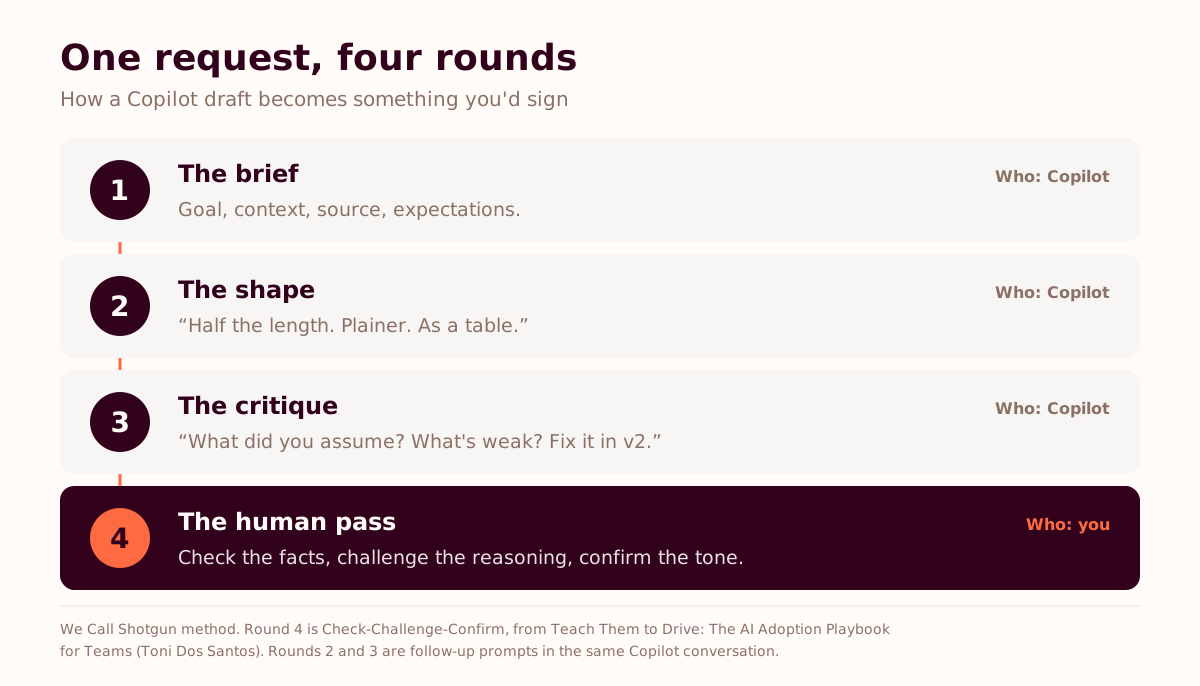
- The brief. Goal, context, source, expectations (tip 1), grounded in your files (tip 2).
- The shape. Short follow-ups that fix length, format and tone.
- The critique. Copilot reviews its own draft and writes version two (tip 4).
- The human pass. You check the facts, challenge the reasoning and confirm the tone, then send.
Round two runs on a small vocabulary. These follow-ups do most of the work:
- "Half the length. Keep the numbers."
- "Plainer, for someone outside the team."
- "As a table with these columns: owner, date, status."
- "Give me three versions with different opening lines."
- "Keep everything, change only the tone to direct."
- "What would you cut?"
When a conversation produces something good, save the prompt. Copilot Prompt Gallery, inside Copilot, lets you save prompts and share them with colleagues, according to Microsoft Learn. The best prompt on a team often sits in one person's chat history, and nobody else knows it exists.
My view: most people who call Copilot useless are judging round one.
Why do some teams get more out of Copilot than others?
Because the habits spread past one person. In Microsoft's 2026 Work Trend Index, the most advanced AI users (Microsoft calls them Frontier Professionals) are far more likely than others to say their manager sets quality standards for AI work (83% against 57%) and that their team shares AI tips, agents and mistakes (61% against 36%).
Microsoft saw the same thing inside its own walls. Copilot use among its sellers plateaued until teams started from business goals and ran weekly peer-led huddles, Kathleen Hogan wrote on the Official Microsoft Blog in September 2026 (our analysis).
Five habits in one head don't change a team's week. A team changes when one recurring task gets rebuilt with Copilot in the loop, measured against a baseline, with a manager who goes first. We call that task the Painful Tuesday: the report, meeting or update everyone dreads. It's one of the frameworks behind our Copilot programme for teams. The tool was never the problem. Nobody taught them to drive.
For teams with Copilot licences
Bring one task your team does every week.
Twenty minutes with Toni or Meera. You'll leave with the four-part brief for that task, the files to ground it in and the baseline to measure before and after. Tool-agnostic, so nobody on the call is selling you a licence.
Book a 20-minute call →How to cite this. Microsoft's Copilot guidance says a prompt can include four parts (goal, context, source and expectations) and that only the goal is required. In Microsoft's 2026 Work Trend Index, a survey of 20,000 AI users at work in 10 markets, 86% said they treat AI output as a starting point and 50% named quality control of AI output as a human skill that matters more as AI takes on work.
Frequently asked questions
How do I write a good prompt for Microsoft Copilot?
Give it the four parts from Microsoft's own guidance: the goal (what you want), the context (why, and who it's for), the source (which files, emails or meetings to use) and the expectations (length, format, tone). Only the goal is required. A prompt such as "Summarise where the Alpha project stands for our COO, using the status report, in five bullets under 200 words" hands Copilot everything it would otherwise guess.
How do I reference a file or meeting in a Copilot prompt?
Type / in Microsoft 365 Copilot Chat and start typing the name of a file, meeting, email or person, then pick it from the menu. People, meetings and emails need Work IQ switched on in the chat. With Work IQ off you can reference files only, and without a Microsoft 365 Copilot licence Copilot Chat works with files you upload.
Why does Copilot give generic answers?
Usually because the prompt left out the context or the source, so Copilot filled the gap with generic material. Say who the output is for and what they'll decide with it, and point Copilot at the specific file, meeting or email to use. If the answer is still off, check which of the four parts (goal, context, source, expectations) is missing.
Can Copilot check its own work?
Partly. Ask it to list the assumptions it made, the claims that need a source and the weakest part of its draft, then to write a second version. That catches some errors before a reader does. It doesn't replace a human check: Copilot can miss its own mistakes, so a person still checks the facts, challenges the reasoning and confirms the tone before anything goes out.
Do these Copilot tips need a paid licence or admin settings?
No settings. Four of the five tips work in any version of Copilot Chat. The exception is referencing your meetings, emails and colleagues, which needs a Microsoft 365 Copilot licence and Work IQ switched on. Free Copilot Chat users can still upload a file and ground the answer in it.
How many follow-up prompts should I use in Copilot?
Our method uses three rounds before your own review: the brief, a round to fix shape and tone, and a round where Copilot critiques its draft and writes version two. Microsoft's WorkLab guide calls the initial ask just a starting point, and 86% of AI users in Microsoft's 2026 Work Trend Index say they already treat AI output that way.
Where can I find ready-made Copilot prompts?
Inside Copilot, in Copilot Prompt Gallery, where you can also save your own prompts and share them with colleagues. Our free Driver's Pack, from Teach Them to Drive, includes a Prompt Pack of 40 before-and-after prompts across five functions.
Sources and further reading
- Microsoft, 2026 Work Trend Index Annual Report: Agents, human agency, and opportunity, 5 May 2026. Survey of 20,000 knowledge workers who use AI at work in 10 markets, including the UK and France, by Edelman Data x Intelligence, February to April 2026
- Microsoft Support, Get started writing prompts in Microsoft 365 Copilot
- Microsoft Support, Write a great prompt in Microsoft Copilot
- Microsoft Support, Refer to specific files and more in Microsoft 365 Copilot
- Microsoft Support, Catch up on work quickly using Microsoft 365 Copilot Chat
- Microsoft Support, Microsoft 365 Copilot Chat, for what licensed and unlicensed users can reference
- Microsoft WorkLab, Seven Tips for Having a Great Conversation with Copilot, 31 October 2023
- Microsoft Learn, Copilot Prompt Gallery
- Kathleen Hogan, What we've learned from Microsoft's own AI transformation, Official Microsoft Blog, 17 September 2026
- Templafy, 95% of Knowledge Workers Edit AI-Generated Documents Before They're Business-Ready, 1 October 2026
- Why AI Training Fails After the Workshop: What Microsoft Learned From 200,000 Employees, We Call Shotgun, 24 September 2026
- What is Microsoft Copilot Notebooks, and how should your team use it?, We Call Shotgun, 15 September 2026
- From Prompting to Task Delegation: The 2026 AI Adoption Shift for UK Businesses, We Call Shotgun, 10 August 2026
- Which Prompt Literacy Skills Should Non-Technical Managers Learn First in 2026?, We Call Shotgun, 29 April 2026
- Toni Dos Santos, Teach Them to Drive: The AI Adoption Playbook for Teams