ChatGPT Images 2.5 is OpenAI's image model, released on 8 September 2026. Compared with Images 2.0 from April, it generates up to 50% faster, keeps the subject of a reference photo intact through edits, and follows editing instructions more reliably across several turns. It adds four tools: Sketch, Templates, comments placed on the image, and shareable prompts. It's rolling out to every ChatGPT, ChatGPT Work and Codex tier. For developers there are two API models, GPT-Image-2.5 Flare (fast, the default) and GPT-Image-2.5 Sunburst (slower, more precise). Against Google's Nano Banana Pro, OpenAI still wins on text and layout; Google keeps 4K output and a 14-image reference lock.
In short
- Images 2.5 is a speed and editing release, with new tools in the ChatGPT interface. The model reads reference photos better and holds an edit across a conversation. OpenAI hasn't announced a new resolution ceiling.
- Sketch, Templates, on-image comments and shared prompts change who on a team can make a usable visual, which matters more for adoption than the quality jump.
- Pick by output: letters, layouts and iterative edits go to ChatGPT; print-resolution photoreal work with a fixed cast of products or people goes to Nano Banana Pro. Most teams should use whichever licence they already pay for.
- Six workflows below, drawn from what we run with client teams on Images 2.0, with a note on what 2.5 changes for each. Our own 2.5 test set hasn't run yet; we say so where it matters.
The visual nobody has time to make
You've got the copy and the offer. Now you need one visual to go with them. An announcement graphic, a one-pager for the deck, a product shot for the landing page.
And you're stuck again. Three days in the design queue, or a Canva template that looks like every other Canva template.
That's the job I test an image model against. Can a marketing manager, a sales engineer or an HR coordinator get to a visual they'd put in front of a client, without a designer and without a reroll marathon? Images 2.0 answered yes for the first time in April, because it could spell. We wrote up what four months of it taught us and the full Images 2.0 business guide.
What is ChatGPT Images 2.5?
ChatGPT Images 2.5 is the image generation and editing model OpenAI shipped on 8 September 2026 inside ChatGPT, ChatGPT Work and Codex (OpenAI's announcement). OpenAI's own summary: sharper details, faster generation, more precise editing, and better tools for creating and sharing. It replaces Images 2.0 as the default across all tiers, on desktop, mobile and web.
Two facts matter for a company. Every tier gets it, including free accounts, so the version your team uses at work and the version they use at home are the same. And the interface changes (Sketch, Templates, comments, shared prompts) are ChatGPT features, so they don't come with the API models.
OpenAI's launch video. If it doesn't load here, watch it on openai.com.
What's new in ChatGPT Images 2.5 compared to Images 2.0
Images 2.0 arrived on 21 April 2026 as the first OpenAI image model that reasons before it draws: it plans a layout, counts objects, checks its own output and can search the web mid-generation (The New Stack's breakdown). It rendered text in over a dozen languages, produced up to eight coherent images from one prompt and topped out at 2K. Over the summer it gained transparent backgrounds and, on 25 August, stickers.
Images 2.5 doesn't touch that architecture. It works on the three things that made 2.0 slow to live with at work: waiting, drift and the blank prompt box.
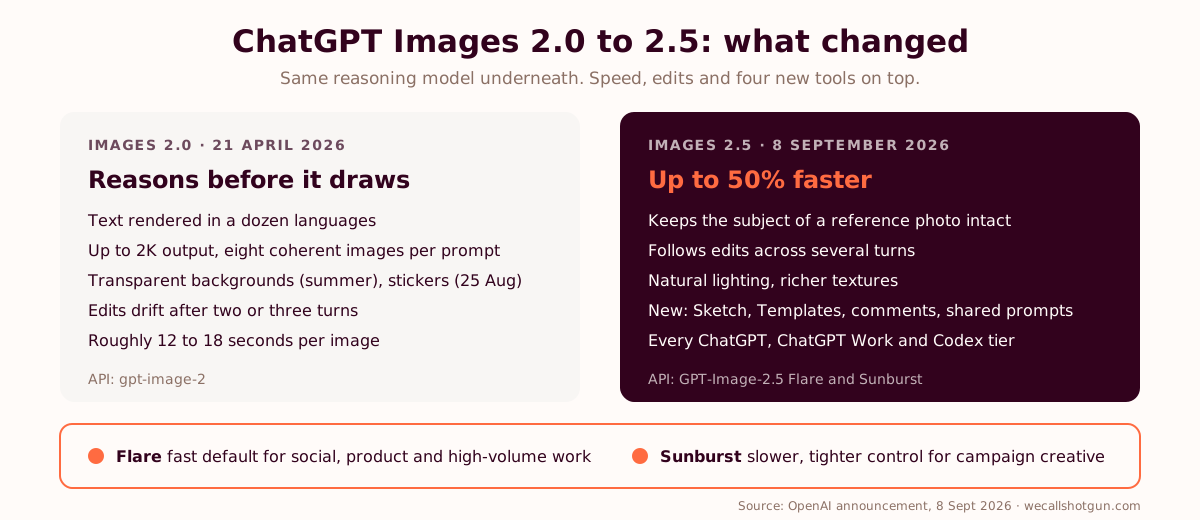
| What changed | Images 2.0 (April 2026) | Images 2.5 (September 2026) | Why it matters at work |
|---|---|---|---|
| Generation time | Roughly 12 to 18 seconds per image, per our April guide | Latency cut by up to 50%, per OpenAI | A colleague who waits 15 seconds per attempt tries three times. At 7 seconds they try six. |
| Reference photos | Good on style, drifted on the subject after two or three edits | Better at preserving the subject in the reference photo | Your product stays your product across the variant set. Faces stay the same person. |
| Multi-turn editing | "Change the headline" sometimes changed the layout too | Follows editing instructions more reliably across turns | Fewer full rerolls when only one element is wrong. |
| Rendering | Strong, occasionally flat lighting | More natural lighting and richer textures | Product and people shots look less generated. |
| Sketch | Upload a photo of a drawing | Draw inside ChatGPT, then generate from the sketch | Layouts, wireframes and diagrams start from what's in your head. No prompt to write first. |
| Templates | Blank prompt box | Starting points for flyers, product photos, posters, logos and icons, with follow-up questions | The least AI-comfortable person on the team gets a form to fill in instead of an empty page. |
| Comments | Describe the change in text | Place a comment on the exact spot of the image | "This button, not that one." Ends the paragraph-long description of a two-pixel fix. |
| Shared prompts | Copy-paste into Slack | Share a prompt so others run it with their own photos and details | A brand prompt becomes something a team reuses instead of something one person owns. |
| Resolution | Up to 2K | No new ceiling in the announcement | Print at A3 and above still points to Google's 4K. |
| API | gpt-image-2 | GPT-Image-2.5 Flare (fast default) and Sunburst (precision, longer generation) | Two price-quality points to route by job. |
The four new tools, and who they're for
Sketch. A drawing canvas inside ChatGPT. You draw the rough shapes, tap confirm, and ChatGPT loads a prompt that turns the sketch into a finished image. TechRadar, after a day with it, said the tool "does look a little bit like MS Paint from 1995, but it's good enough for doing a quick sketch with your finger, or mouse" (TechRadar's hands-on). The people who need it most are the ones who can picture a layout and can't describe it: a product manager with a screen in mind, a sales engineer with an architecture on a whiteboard, an ops lead with a process flow.
Templates. Starting points for the formats people ask for most: flyers, posters, product photos, logos, icons. Each one opens with a base prompt and then asks follow-up questions to fill in what it needs. In our sessions, the colleague who never touches AI is the one who gets stuck at the empty box. A template turns the empty box into a form. We used to build that form by hand for clients. Now it ships.
Comments on the image. Click a spot, type "make this the cream colour from the header", generate. Before, the same edit meant describing the location in words, and the model had to guess which of three buttons you meant. This is the feature I'd expect to change daily behaviour fastest, because it removes the skill of describing space.
Shared prompts. Share a prompt you've used so someone else runs it with their own photo and their own details. For a team this is the missing piece: a brand prompt written once by marketing, reused by sales, HR and the regional office without anyone pasting a text block into a chat.
Flare and Sunburst: the API side
Developers get two models. OpenAI positions GPT-Image-2.5 Flare as the default for most applications, with the same quality, editing and speed gains as the ChatGPT model; press coverage of the launch cites two to four times the speed of gpt-image-2 in OpenAI's evaluations, and lists creator and social content, product experiences, visual search, rapid prototyping and high-volume generation as its intended jobs. GPT-Image-2.5 Sunburst trades speed for tighter control across edits, for production-ready campaign creative and polished product imagery (Unite.AI, AlphaSignal).
On price, launch coverage reports both models at the same token rates as gpt-image-2. Reference-image edits bill at high-fidelity input rates whatever your output setting, which is the line that inflates a variant-testing budget. Check OpenAI's pricing page before you forecast; we checked on 8 September 2026 and per-image figures are estimates, not list prices.
| ChatGPT Images 2.5 pricing | What it costs | Source |
|---|---|---|
| In ChatGPT (Free, Go, Plus, Pro, Work, Enterprise) | Included in every tier | OpenAI announcement, 8 Sept 2026 |
| API, text input | $5 per million tokens ($1.25 cached) | Launch coverage (Unite.AI) |
| API, image input | $8 per million tokens ($2 cached) | Launch coverage (Unite.AI) |
| API, image output | $30 per million tokens | Launch coverage (Unite.AI) |
| Estimated per 1024×1024 image | Roughly $0.006 (low) to $0.21 (high) at gpt-image-2 rates | Our Images 2.0 guide |
Put a number on the design queue before you put a model on it.
Run the AI ROI calculator →See how we work with enterprisesFive inputs, published UK data, a conservative-to-optimistic range. No email gate. Bring the result to the budget meeting instead of a screenshot.
ChatGPT Images 2.5 vs Nano Banana Pro
Nano Banana Pro is Google's name for Gemini 3 Pro Image, released on 20 November 2025. It outputs at 1K, 2K and 4K, takes up to 14 reference images in one go, keeps up to five people consistent across generations, grounds prompts in Google Search, and stamps every image with a SynthID watermark (Google's announcement). It lives in the Gemini app, in Slides, Vids and NotebookLM for Workspace customers, in Google Ads, and in Vertex AI for developers (Workspace updates, Google Cloud). Since 26 February 2026 the everyday default in the Gemini app is the cheaper Nano Banana 2, with Pro kept as the premium option (TechCrunch).
The comparison below is what we can support from vendor documentation and our Images 2.0 runs. Where 2.5 changes a row, it's OpenAI's claim until our test set says otherwise.
| Criterion | ChatGPT Images 2.5 | Nano Banana Pro | Our call for business use |
|---|---|---|---|
| Text and layout | Ahead since 2.0: headlines, prices, promo codes, labels at three sizes, a dozen languages | Good, with occasional quirks on dense or small type in public tests | If the visual has letters in it, ChatGPT. |
| Photorealism | Improved lighting and textures in 2.5 | Still the reference for skin, light and material | Hero shots for print or a campaign lead image: Google. |
| Resolution | Up to 2K | Up to 4K | Trade-show panels, posters, packaging: Google. |
| Reference images | Reference photos preserved better in 2.5; no published count | Up to 14 references, five consistent people | A fixed cast of products and faces across a campaign: Google. One product across a set: either. |
| Editing loop | Multi-turn edits, comments on the image, Sketch input | Conversational edits in Gemini; sketches as uploaded images | Iterative work inside the chat where the copy is being written: ChatGPT. |
| Speed | Up to 50% faster than 2.0 | Slower at 4K, by design | Volume and variants: ChatGPT (Flare). |
| Where it lives | ChatGPT, ChatGPT Work, Codex, API | Gemini app, Slides, Vids, NotebookLM, Google Ads, Vertex AI | Use the one inside the suite your team already opens every morning. |
| Provenance | C2PA metadata | SynthID watermark | Both pass a compliance review. A screenshot strips C2PA metadata; SynthID is built to survive one. |
| API price | Token-based, roughly $0.006 to $0.21 per image reported for gpt-image-2 rates | $0.139 per image up to 2K, $0.24 at 4K on the Gemini API | ChatGPT cheaper at volume, Google predictable per image. |
Most teams overthink this table. The difference between a 4.5 and a 5 on photorealism is invisible to a prospect reading a proposal on a phone. The difference between a team that makes its own visuals and a team that waits three days for a designer is visible in every cycle time you measure. So the decision rule is boring: use the licence you already pay for, route the two or three jobs it's bad at to the other one, and stop re-evaluating every time a lab ships. We wrote about why in AI model fatigue in the enterprise.
ChatGPT Images 2.5 use cases for business: six workflows, hands-on
These are the workflows we've run with client teams on Images 2.0 since April. For each one: what we do, the prompt skeleton, what 2.5 changes, and the check that catches the bad output. The 2.5 notes come from OpenAI's release notes and the first press hands-ons, not from our own test set, which hasn't run yet.
1. Marketing: campaign variants with text that spells
The brief that broke every image model until April: a headline, a price and a promo code on one graphic, at three sizes, all spelled right. On 2.0 this works when the prompt gives every element an address. Our sale-banner brief reads like this:
Prompt skeleton: sale banner
Create a bold 1:1 sale banner. The words "50% OFF" in massive condensed black serif typography filling 70% of the frame, stacked with tight line spacing. Background: saturated cherry red with a subtle paper grain. Top right corner: a small cream starburst, inside it render exactly: "TODAY ONLY". At the bottom, a thin cream rule and one small line of clean sans-serif, render exactly: "Use code SAVE50 at checkout". Style: retro department store advertising, updated. No extra text, no watermarks, no stock photos.
What 2.5 changes: the promo code for the French market becomes a comment on the code line. No new prompt. And the brief above becomes a shared prompt, so the regional marketer runs it with her own price and her own code. The check stays the same: read every rendered word out loud against the brief.
2. Sales: the product in the customer's context
The brief we hear most from sales teams: show the product in the prospect's environment for the proposal, without a photo shoot per deal. On 2.0, a reference photo of the product plus a described setting worked for one image and drifted on the next edit: a vent appeared, a logo went missing. We covered the workaround (cut the product out, then compose) in the Campaign Multiplier. 2.5's better subject preservation is the claim we most want to verify, because it's the one that turns this from a demo into a workflow. The check: a named product owner compares the generated unit against the real spec sheet before anything reaches a prospect.
3. Product: a wireframe from a sketch
A product manager draws six boxes and an arrow on paper, photographs it, and asks for a clean wireframe. On 2.0 the phone photo was the input. Sketch removes the phone: draw on the canvas, confirm, get the wireframe, then comment on the button that's in the wrong place. For teams that spend their first hour with a designer explaining what they meant, that hour moves. The check: annotate the wireframe with the real copy before anyone builds from it, because the model will invent placeholder text that looks final.
4. Internal communications and HR: flyers and onboarding visuals
The town-hall flyer, the benefits enrolment poster, the "how to book a room" one-pager. Nobody budgets a designer for these, so they get made in Word. Templates cover flyers and posters out of the box, with follow-up questions. That's the format we used to build by hand (we called it the Form-Fill Template) so the least confident colleague could ship on-brand. Add the brand block from the first workflow as a shared prompt and HR's flyer matches marketing's. The check: dates and room numbers, digit by digit.
5. Operations and e-commerce: packshots and localisation
A product on a white or transparent background, then the same product with the label in five languages. Transparent backgrounds arrived on 2.0 in the summer and remain the most useful change for anyone who drops assets into slides or a web page. The localisation part is where OpenAI's text rendering earns its keep: Japanese, Korean, Chinese, Hindi and Bengali are on the list of scripts it handles natively. What 2.5 changes is throughput. At half the wait, a catalogue of 200 SKUs is an afternoon. The check: a native speaker per language, no exceptions, because "legible" and "correct" aren't the same word.
6. Reporting: the infographic from a data table
Five stat blocks, five icons, a header and a footer, in one layout. It used to take an afternoon in Canva. On 2.0 it takes one prompt, and the prompt we give away in our newsletter piece on Images 2.0 still holds. The failure mode hasn't gone anywhere: the model pattern-matches digits. It'll put "47%" beside a label that reads 74%. I keep the source table open in a split screen and check every number, two minutes per infographic. 2.5 speeds the render. It doesn't remove the check, and if anything a faster tool makes people skip it more.
The three rules that survived the version change
Everything above rests on the way the brief is written, and that didn't change between 2.0 and 2.5. Our version:
- Quote it or lose it. Text inside double quotes gets rendered character for character. Unquoted text gets interpreted.
- Every element gets an address. "Headline at the top" is vague. "Headline fills the top 70% of the frame, three stacked lines" is an address.
- Name the junk you don't want. Glowing lightbulbs, handshakes, watermarks, stray text. Close every prompt with a ban list.
"The first prompt named an output. The rewrite described the job." Toni Dos Santos, on the procurement marketing lead who was convinced the model didn't get her brand, in ChatGPT finally makes AI images that are useful for our brand.
Comments and Sketch make rule two cheaper. They don't make it optional. A sketch with no addresses gets a layout the model chose.
Rolling it out to a team without a mess
Microsoft's 2024 Work Trend Index found 75% of knowledge workers already using generative AI at work and 78% bringing their own tools (Microsoft and LinkedIn). With Images 2.5 on the free tier, the visuals are already being made. The only question is whether they're being made on a personal account with the client's product photo in it.
What we put in place with clients, in the order it usually happens:
- Account tier first. Image work with client material happens on ChatGPT Work or Enterprise seats, where workspace data is excluded from training by default. The AI policy for employees names the tool and the tier.
- Likeness and logos. A headshot of a real person needs that person's written consent. A client's logo needs the client's. This one line prevents the awkward email.
- A shared prompt library instead of a Slack thread. The brand prompt, the packshot prompt, the infographic prompt, shared through the new prompt-sharing feature and owned by one named person.
- A review step before external use. One named reviewer per team. The model spells now. It still misreads a spec sheet.
- Provenance kept on. C2PA metadata stays attached; nobody strips it to make a file smaller. The same logic as our guide to shared AI conversations: assume the asset travels.
- A baseline. How long does a visual take today, from request to approved file? Measure it on ten real requests before the rollout, then again at 30 days. That number is the ROI, and it's the one the CBI's Adoption Decade report says separates the companies seeing returns from the ones that aren't: 49% of deployment leaders report ROI against 15% of laggards (our analysis).
Then someone sits with each team, on their own briefs, for two hours. The tool was never the problem. Nobody taught them to drive.
A faster image model changes nothing if the team still waits for the designer. Find out where yours actually stands.
Run the free AI maturity diagnosis →Book 20 minutesEight minutes, five dimensions, a scored report. Bring the visual your team couldn't make last week.
What we haven't tested yet
Three claims in OpenAI's announcement decide whether 2.5 is a version bump or a workflow change, and we haven't measured any of them on our own briefs: the 50% latency cut, subject preservation across a five-edit chain, and whether comments hold the rest of the image still. We run the same set of briefs on every image release, the way we run one test set on every text model. This article gets updated when the numbers are in. Until then, treat the 2.5 rows above as OpenAI's word.
Frequently asked questions
What is ChatGPT Images 2.5?
ChatGPT Images 2.5 is OpenAI's image generation and editing model, released on 8 September 2026. It produces sharper detail with more natural lighting, generates up to 50% faster than Images 2.0, preserves the subject of reference photos better and follows multi-turn editing instructions more reliably. It adds Sketch, Templates, on-image comments and shareable prompts inside ChatGPT.
What's the difference between ChatGPT Images 2.0 and 2.5?
Images 2.0 (April 2026) introduced reasoning before drawing, reliable text rendering, 2K output and eight-image batches. Images 2.5 keeps that model architecture and improves speed, reference-photo fidelity and multi-turn editing, then adds four interface tools: Sketch, Templates, comments and prompt sharing. OpenAI's announcement doesn't mention a new resolution ceiling.
Is ChatGPT Images 2.5 available on free and business plans?
Yes. OpenAI is rolling it out to all ChatGPT, ChatGPT Work and Codex users across every tier, on desktop, mobile and web. For company use, the tier still matters: ChatGPT Work and Enterprise seats exclude workspace data from training by default, which is where client material belongs.
What are GPT-Image-2.5 Flare and GPT-Image-2.5 Sunburst?
They're the two API versions of the model. Flare is the default for most applications, with the same quality, editing and speed improvements as the ChatGPT model, aimed at social content, product experiences, visual search and high-volume generation. Sunburst takes longer to generate and offers tighter control across edits, for production-ready campaign creative and polished product imagery.
Is ChatGPT Images 2.5 better than Nano Banana Pro?
For visuals with text, layouts and iterative edits, ChatGPT is the safer default. For print-resolution photorealism and campaigns with a fixed cast of products or people, Nano Banana Pro keeps the edge with 4K output, up to 14 reference images and five consistent people. Most business teams should use the model inside the suite they already pay for and route the two or three jobs it's weak at to the other.
What are the best business uses of ChatGPT Images 2.5?
Campaign variants with real headlines and promo codes, product shots in a customer's context for proposals, wireframes from a sketch, internal flyers and onboarding visuals from Templates, packshots and multilingual label localisation, and infographics from a data table. Each needs a human check on numbers, names and product details before external use.
We sit in the passenger seat for this exact problem
We're We Call Shotgun, a founder-led AI adoption practice working across the UK and France. We're tool-agnostic across ChatGPT Enterprise, Microsoft Copilot, Google Gemini and Claude, and every engagement starts with a baseline and ends with a measured change in cycle time on real workflows. 2,000+ professionals coached, 50+ companies, 5.0/5 average rating. UK engagements from £3,500.
Run the free AI maturity diagnosis Book a free 20-minute callSources and further reading
- OpenAI, Introducing ChatGPT Images 2.5: the announcement, availability and the launch video
- TechRadar, 24 hours with ChatGPT Images 2.5: hands-on notes on Sketch, Templates and comments
- Unite.AI and AlphaSignal: Flare and Sunburst positioning, latency and pricing coverage
- The New Stack, ChatGPT Images 2.0: the April 2026 release and reasoning before drawing
- Google, Nano Banana Pro, Workspace updates, Google Cloud and Gemini API pricing: resolutions, reference limits, availability and per-image prices
- TechCrunch, Nano Banana 2: the February 2026 default in the Gemini app
- Microsoft and LinkedIn, 2024 Work Trend Index: 75% of knowledge workers using generative AI at work, 78% bringing their own tools
Vendor pages were checked on 8 September 2026. Per-image API costs are estimates derived from token rates, not list prices. The workflows and prompts are ours, run on Images 2.0 with client teams since April 2026; notes on what Images 2.5 changes reflect OpenAI's announcement and press hands-ons, not our own test set, which we'll publish once it has run.